Get your own AI Chief of Staff.
An AI-supported operating system for your week.
One-to-one, we set up three practical routines for your priorities, meetings and decisions, inside the AI tool that suits you.
Each routine is shaped around your real work and tested before you rely on it. The AI prepares the drafts, and you keep control of every decision and every action.
- One-to-one sessions
- Built around your real work
- Works in ChatGPT, Claude or Microsoft Copilot
- Plain English, no coding
Not ready yet? Join the free monthly live session.

Give AI a regular job in your week.
AI can draft an email, summarise a document or help you think a problem through. It can also help run the regular work of your week.
For many business owners and leaders, the briefing, the meeting follow-up and the decision preparation are still done by hand. An AI Chief of Staff connects those pieces into routines that run every week inside ChatGPT, Claude or Microsoft Copilot.
We set it up together and I show you how to run it, so it keeps working long after our sessions end.
Work it typically takes off your desk:
- Weekly priorities
- Inbox triage
- Meeting notes
- Follow-ups
- Action owners
- Decision prep
- Status updates
- Stakeholder updates
- Reporting
- Risk tracking
- Planning
- Drafting
- Marketing
- Social media
These are examples. Your AI Chief of Staff is built around the tasks that fill your week, so it fits the way you actually work.
How we work together
Start with a free session and go further when you are ready.
1 · Free
30-Minute Live Session
Once a month · Online
Once a month I run a free live session where we build one workflow together in real time. You see it working and leave with one routine you can use that week.
Reserve your spot
2 · One-on-one program
AI Chief of Staff Sprint
One-to-one · Two 1-hour sessions a week
In each session we design, set up and test a routine together, using your real work. By the end of the Sprint you have:
- Three tested routines for priorities, meetings and decisions.
- Your context brief, blueprints and review rules.
- A weekly rhythm and a roadmap for what to build next.
We choose ChatGPT, Claude or Microsoft Copilot together in session one.
Founding client places available. Ask in your fit conversation.
Book a fit conversation
3 · Consulting
AI Operating System
90 days · Your team and your business
Ready to scale?
For business owners and leaders who want to grow without everything running through them. Together we put the workflows and systems in place across your team, so the business runs well as it grows.
- Month 1. Your operating system, covering the brief, decisions and follow-up.
- Month 2. Team and client workflows, such as delivery, proposals, reporting and delegation.
- Month 3. Adoption across the team, a quality review and what comes next.
Where this leads
Your AI Chief of Staff is the first step.
Three routines show how AI fits into your week. You learn what to hand over, what to check and what to keep for yourself. From there, the work grows with your business.
Workflow optimisation
We look at the processes that run through your business, such as proposals, client onboarding, reporting and marketing, and redesign them with AI built in.
Virtual AI employees
I build AI agents that take on a defined role in your business, such as preparing client updates, drafting marketing content or keeping your reporting up to date. You and your people stay in charge.
AI across your team
We bring the routines and workflows to your team, so the business can grow without everything running through you.
What you leave with
At the end of the Sprint, these are yours to keep, change and keep using.
Three tested routines
For your priorities, meetings and decisions, tested on your real work.
A business context brief
The background your AI assistant works from every time, so its drafts fit your business.
A step-by-step blueprint
A guide to running each routine in your own AI tool from day one, with the prompts saved and ready to use.
Input, review and approval rules
For each routine: what goes in, what you check, and what always comes back to you.
A weekly operating rhythm
When each routine runs in your week, and how long it takes you.
A roadmap for what comes next
The next workflows worth building, in the order that makes sense for you.
How it works in practice
Most routines start simply. You give the AI the relevant material, such as your calendar, task list, notes or a meeting transcript, and it prepares a structured draft for you to review. We start with routines that are reliable, useful and safe to run in your real work.
Included in the Sprint
Routines that run on material you give them: pasted text, exported lists, your own files or meeting notes. The AI prepares, and you review and approve.
Possible later
Working more directly with your calendar, email or files, where your AI tool supports it. We look at this once the first routines are working well.
Depends on your setup
What you can connect depends on your AI licence and your organisation's IT settings. If needed, I log into your account and set it up with you. I don't build custom software or integrations.
Why I do this
AI that works for your people.
I look at the human side of AI implementation: how work is designed, how decisions are made and handed over, and how safe people feel to try something new, ask questions and speak up. In my corporate career I saw again and again how much depends on how a change lands with people.
My aim is to help businesses spend their time on what really makes them successful. Routine work goes to AI. Your people get the time and room to bring their skills, talents and judgement to their work. That is what drives productivity and new ideas.
Your customers
Time to listen properly, follow through and serve them well.
Your people
Time and room for your people to bring their skills, talents and ideas to their work.
Your decisions
Time to think clearly before the calls that shape your business.
Your community
Time to give back to the community your business is part of.
That is why I bring together AI workflow design, change management, work design, psychological safety and psychosocial risk. Microsoft's 2026 research points the same way: culture and manager support account for more than twice the reported impact of AI compared with individual factors. Work Trend Index 2026
Your AI Chief of Staff, in three routines
Each routine runs inside ChatGPT, Claude or Microsoft Copilot. Here is what you give it, what you get back, and what that gives you.
Routine 1
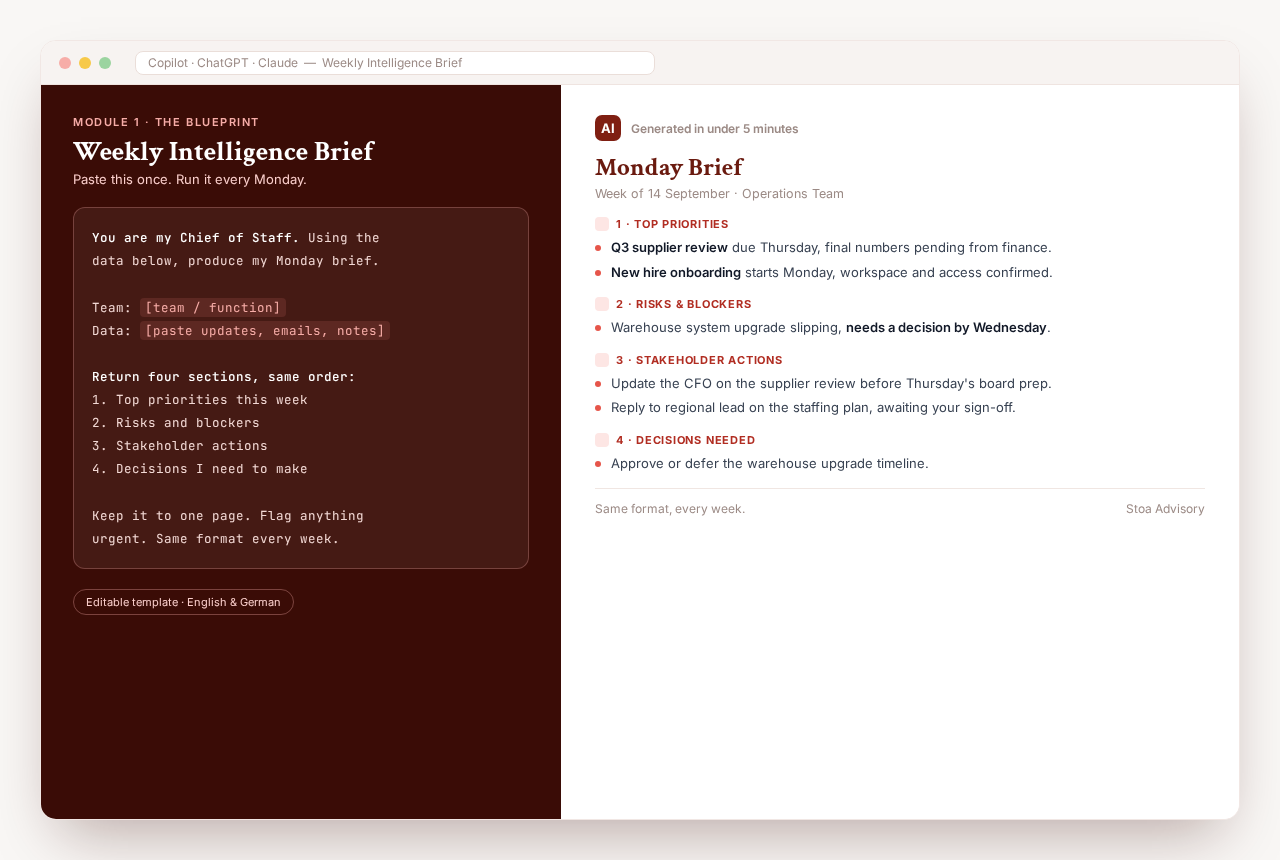
Weekly Operating Brief
You give it
Your calendar for the week, your open task list and last week's notes, pasted in.
You get back
- Your top three priorities for the week
- Decisions waiting on you
- Anything slipping or at risk
- Who you need to talk to and why
You start the week knowing where your attention needs to go.
Routine 2
Meeting-to-Action
You give it
Your meeting notes or transcript, however rough they are.
You get back
- The decisions that were made
- Every action with a named owner and date
- A follow-up email ready for you to check
- Open questions for next time
Every meeting ends with clear next steps and everyone knows who owns what.
Routine 3
Decision Preparation
You give it
The question in front of you and the background you already have.
You get back
- Your options, side by side
- The risks and trade-offs of each
- Questions you still need answered
- A recommended next step
You decide with the full picture in front of you.
You stay in charge. The AI drafts and prepares, and nothing is sent or actioned without your approval.
Your week, before and after
Then you add to it
Each routine runs from a blueprint saved in your own AI tool. Once the first three are working, you use the same approach for the next part of your week.
- Proposals
- Client communication
- Reporting
- Team delegation
What I bring
I do the design and setup work with you, so you get routines you actually use, without working it all out alone.
Choosing what to build
We find the few workflows that will make the biggest difference to your week, before anything gets built.
Turning messy work into routines
Real work is untidy. I help you turn it into clear steps an AI assistant can follow.
Designing each routine
Clear inputs, clear outputs, the right prompts, and a point where you review before anything moves.
Testing on real examples
We run every routine on your own material and adjust it until the output is something you would actually use.
Setting sensible boundaries
What information is appropriate to use, and which decisions and messages always stay with you.
Building a rhythm that lasts
A weekly habit you can keep running and extending after the Sprint, without me.
Is this the right fit?
An honest check before we talk.
It suits you if
- You lead a business, a function or a team.
- You want AI built into how your week runs, whether you are new to it or use it now and then.
- You have a paid plan for ChatGPT, Claude or Microsoft Copilot, or are happy to set one up.
- You can commit to two one-hour sessions a week.
- You are willing to test the routines on real work between sessions.
- You want to own the system and keep extending it after we finish.
It is not the right fit if
- You want autonomous AI agents that act without your input or review.
- You need custom software or a complex systems integration project.
- You are after a one-off introduction to AI. The free monthly session is a better place to start.
What happens next
- 1
Book a fit conversation
A free 30-minute call. Pick a time that suits you.
- 2
We talk about your work
What fills your week, which AI tool you have, and whether the Sprint is the right starting point.
- 3
Timing and investment
If it is a fit, we agree a start date and I share the investment for the Sprint. There is no obligation to go ahead.
Four things worth knowing before you start
01
Your data
You work in your own AI account with your own files, on a paid plan that protects your data. We agree at the start what information is appropriate to use and what stays out.
02
The setup
We set up each routine together in our sessions, and I can do the setup in your account for you. You learn how to run it and change it as your work changes.
03
The pace
We take one routine at a time and test it in your real work before we move to the next one.
04
What you own
Every blueprint, context brief and routine we set up is yours to keep, change and use however you like.

Monika Gietz
Founder, Stoa Advisory
I started Stoa Advisory to help leaders turn AI tools like ChatGPT, Claude and Microsoft Copilot into a working system for their week. I set it up with you around how you work, and show you how to keep running and extending it after we finish.
Before this I spent my career inside Cummins, ABB, Siemens and Worley, leading change programs and building teams across Europe, Asia Pacific and the Americas. More recently that work moved into AI adoption.
What I saw again and again is that having AI tools and using them well in a business are two different things. The difference sits in the workflow design, meaning what the AI is set up to do, what information it works from and how people adopt it in practice.
Working in English, German and Spanish.
Common questions
Is this for me?
It works for business owners, founders, managing directors and team leaders who want less of the coordination and decision load sitting with them personally. You need a paid plan for ChatGPT, Claude or Microsoft Copilot, or be happy to set one up. You do not need a technical background.
Do I need technical skills?
No. Everything is built in plain language inside tools you already know.
Which AI tool do I need?
ChatGPT, Claude or Microsoft Copilot. If your organisation uses Microsoft 365, Copilot is often the most practical starting point. We decide together in the first session.
How much time does the Sprint take?
Two one-hour sessions a week. We agree how long the Sprint runs in your fit conversation, based on what you want to set up. Most people spend about one more hour between sessions applying what we built.
I have tried AI before and my week stayed the same. Why would this be different?
Running single tasks in ChatGPT is a different thing from building routines around your own workflows. The Sprint is built around your real work, so what you leave with fits how you actually run your week.
Is it safe to use business information in AI tools?
Please never put business information into a free public AI tool, because some of them can use what you type to train their models. Use a paid business plan that protects your data. You work in your own AI account with your own files, and at the start we agree what information is appropriate to use and what stays out, based on your tool and your organisation's rules. The AI drafts and prepares. You approve decisions and anything that goes to other people.
Can you set it up for me?
Yes. If it helps, I log into your AI account with you and set everything up, so the routines are ready to run. You still learn how each one works, so you can run it and change it yourself.
Are the routines automated?
Most routines start simply. You give the AI the relevant material, such as your calendar, task list, notes or a transcript, and it prepares a structured draft for you to review. Connecting tools directly is sometimes possible later, depending on your AI tool and your IT settings.
What does the Sprint cost?
I share the investment in the fit conversation, once we know the Sprint is the right starting point for you. A small number of founding client places are available. Ask about them when we talk. There is no obligation to go ahead.
Reserve your spot
Once a month I build one workflow live with the group. Leave your details and I will send you the next date.
The AI Chief of Staff is one part of my work. I also support organisations with change management, transformation, AI adoption, psychological safety and psychosocial risk. See advisory services